
RadiomM
文章22
标签13
分类1
如何设计一个通用化button组件

如何设计一个通用化button组件

公司新开项目,所以很多东西可以重新规范化起来(原来的旧项目经历各种水平参差不齐的人修改,以及无 eslint 等,已经不堪入目),我主动将 button 组件揽下,之前一直没有机会去写这样的组件,正好借此机会学习学习。(由于是 uniapp 的项目,所以在使用方面也是遵循 uniapp)

一、如何设计组件样式

大型的 UI 框架都有一个基本的设计原则跟规范,那么我们在设计组件的时候,也需要这样的东西。最直接的,就是通过跟 UI 沟通,确定好 button 组件的样式,如颜色、大小、形状等。那么我们就可以得出下面的基本样式(注:往后的样式中带&都是写在 zc-button 里面):

1
2
3
4
5
6
7
8
9
10
11
12
13
14
15
$bt-color-default: #fff;
$bt-color-primary: #3c9cff;
$bt-color-success: #0baa82;
$bt-color-error: #f6646c;
$bt-color-warning: #f79c03;
$bt-border-width: 2rpx;
$bt-border-radius: 16rpx;

.zc-button {
position: relative;
align-items: center;
display: inline-block;
box-sizing: border-box;
cursor: pointer;
}

由于 uniapp 的 button 会有一些原来的样式,所以为了妨碍我们的设计,我们需要重置这些样式并修改部分样式:

1
2
3
4
5
6
7
8
9
10
11
12
13
14
15
16
&-reset {
margin: 0;
padding: 0;
text-decoration: none;
background-color: inherit;
font-size: inherit;
color: inherit;
&::after {
border: none;
}
}

&-normal {
padding: 0 24rpx;
font-size: 28rpx;
}

在 tempalte 方面,我们的现阶段的内容如下:

1
2
3
4
5
<template>
<button class="zc-button zc-button-reset zc-button-normal">
<slot></slot>
</button>
</template>

那么在基础样式方面,我们就完成了全部的设计,接下来就是对其他内容的补充。

1、颜色

在上面的基础样式补充之后,只会出现一个只有文字的 button,那么我们需要先丰富颜色这块的内容。我们定义了五种颜色选项,分别是:
default、primary、success、error、warning。对于 default 很简单,只需要下面写即可:

1
2
3
4
5
6
7
&-default {
color: #666;
background-color: $bt-color-default;
border-color: #979797;
border-width: $bt-border-width;
border-style: solid;
}

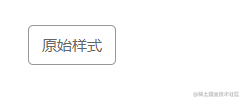
效果如下:

Snipaste_2023-02-08_15-36-08.png

对于其他颜色来说,字体颜色是白色,那么背景色以及边框颜色是一样的,这时候就可以利用 scss 的@minin。

1
2
3
4
5
6
7
@mixin bt-default-style($color) {
color: $bt-color-default;
background-color: $color;
border-color: $color;
border-width: $bt-border-width;
border-style: solid;
}

那么其他颜色就可以写成下面的方式:

1
2
3
4
5
6
7
8
9
10
11
12
13
14
15
&-primary {
@include bt-default-style($bt-color-primary);
}

&-success {
@include bt-default-style($bt-color-success);
}

&-error {
@include bt-default-style($bt-color-error);
}

&-warning {
@include bt-default-style($bt-color-warning);
}

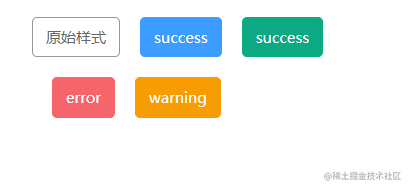
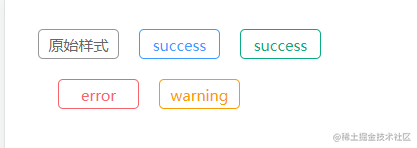
那么效果如下:

Snipaste_2023-02-08_15-50-39.png

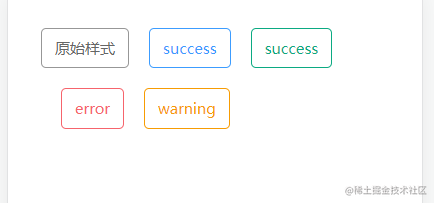
除此以外,我们的项目设计稿还有一种叫做镂空的按钮,具体设计样式如下:

Snipaste_2023-02-08_16-05-04.png

实现起来也是比较简单,如下:

1
2
3
4
5
6
7
8
9
10
11
12
13
14
15
&-plain {
background-color: $bt-color-default;
&.zc-button-primary {
color: $bt-color-primary;
}
&.zc-button-success {
color: $bt-color-success;
}
&.zc-button-error {
color: $bt-color-error;
}
&.zc-button-warning {
color: $bt-color-warning;
}
}

2、按钮大小

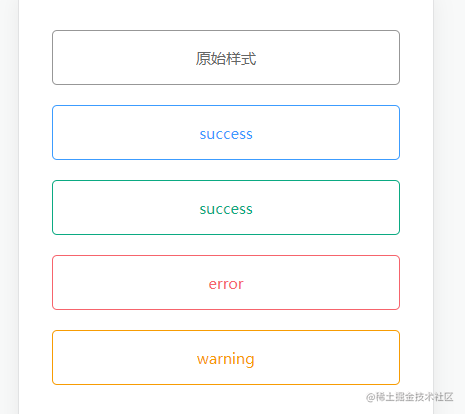
项目的设计,按钮主要是有三种,大,普通,小。在设计大按钮的时候,我们喜欢按钮独占一行,并且占满屏幕,如下:

1
2
3
4
5
6
7
8
&-large {
display: block;
width: 100%;
height: 100rpx;
line-height: 100rpx;
padding: 0 30rpx;
font-size: 32rpx;
}

效果如下(为了演示,父元素设置了padding)

Snipaste_2023-02-08_16-13-08.png

小的效果无差,就是稍微缩小一点:

1
2
3
4
5
6
7
&-small {
min-width: 148rpx;
height: 56rpx;
line-height: 56rpx;
padding: 0 16rpx;
font-size: 28rpx;
}

效果:

Snipaste_2023-02-08_16-19-22.png

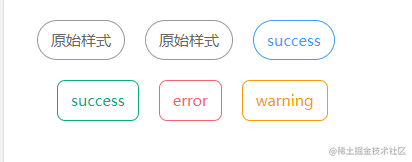
3、形状

这个没啥好提,就是按照设计稿来设计即可:

1
2
3
4
5
6
7
&-square {
border-radius: $bt-border-radius;
}

&-circle {
border-radius: 200rpx;
}

效果:

Snipaste_2023-02-08_16-25-15.png

至此,已完成了 button 组件的样式设计,下面来看看如何整合这些样式。

二、如何整合组件样式

其实组合这些样式比较简单,首先我们先给现有的属性列一下 props:

1
2
3
4
5
6
7
8
9
10
11
12
13
14
15
16
17
18
  props: {
type: {
type: String,
default: 'default'
},
size: {
type: String,
default: 'normal'
},
plain: {
type: Boolean,
default: false
},
shape: {
type: String,
default: 'square'
},
}

其实就分成两类,一种是多属性如:type、size、shape。一种是布尔值的如:plain。两种类型可以分开实现,比如多属性的,我们可以遍历的方式组合,如:

1
2
3
['type','size','shape'].map(item=> `zc-button-${this[item]}`)

// ['zc-button-default','zc-button-normal','zc-button-square']

布尔值类型的则需要判断过后才能决定是否添加 class。那么我们就可以得到下面的 Function:

1
2
3
4
5
6
7
8
9
10
11
12
13
generateClassName (fixed, change) {
const prefix = 'zc-button-'
const classNameArray = []
if (fixed) {
classNameArray.concat(fixed.map(item => `${prefix}${item}`))
}
if (change) {
change.forEach(item => {
this[item] && classNameArray.push(`${prefix}${item}`)
})
}
return classNameArray.joio(' ')
}

接着我们再写一个computed,如下:

1
2
3
bemClasses () {
this.generateClassName(['type','shape', 'size'], ['disabled', 'plain'])
}

为什么要写computed呢?因为绑定的时候不需要执行,而写函数的话,需要多写两个括号执行(有理有据,令人信服)。

三、还有其他松散的东西

  • 比如 button 都会有disabled、loading、这些还是比较简单的,因为原来的 uniapp 里面的 button 组件就有的属性,我们只需要传值就行了。

  • 有的时候,我们也需要提供 text 的属性,也就是如下:

1
2
3
4
5
6
7
8
9
10
11
12
13
14
<button
class="zc-button zc-button-reset"
:disabled="disabled"
:loading="loading"
:class="bemClasses"
@tap.stop="onClick"
>
<slot>
<text
class="bt-text"
:style="{ fontSize: textSize + 'rpx', color: textColor }"
> {{ text }}</text>
</slot>
</button>

这在很多 UI 库都会有相关的属性提供,是为了保证组件直接使用,不必都要写插槽写进文字。插槽的作用就不用多说了,直接是提供对内容的改造,比如可以在里面添加 icon 等。

  • 有时候还需要提供 button 样式修改能力,这样就可以让使用者写出五彩斑斓黑的按钮,我们需要做点改动:
1
2
3
4
5
6
7
8
9
10
11
12
13
14
15
16
17
18
19
20
21
22
23
24
25
26
27
28
29
30
31
32
33
34
35
36
37
38
39
40
41
42
43
44
45
46
47
48
49
50
51
52
53
54
55
56
57
58
59
60
61
62
63
64
65
66
67
68
69
70
71
72
73
74
75
76
77
78
79
80
81
82
83
84
85
86
87
88
89
90
91
92
93
94
95
96
97
98
99
100
101
102
103
104
105
106
107
108
109
110
111
112
113
114
115
116
117
<template>
<button
class="zc-button zc-button-reset"
:disabled="disabled"
:loading="loading"
+ :style="color"
:class="bemClasses"
@tap.stop="onClick"
>
<slot>
<text
class="bt-text"
:style="{ fontSize: textSize + 'rpx', color: textColor }"
>
{{ text }}</text
>
</slot>
</button>
</template>

<script>
/**
* ZcButton button组件
* @description 基于现有设计稿的button组件(按钮文字可以写插槽)
* @property {String} type button按钮的类型:default,primary,success,error,warning
* @property {String} size button按钮大小:large,normal,small
* @property {Boolean} disabled button按钮是否禁用
* @property {Boolean} loading button按钮加载中状态
* @property {String} color button按钮自定义颜色
* @property {String} plain button按钮是否镂空
* @property {String} shape button按钮形状:square,circle
* @property {String} text button按钮文字
* @property {String} textSize button按钮文字大小
* @property {String} textcolor button按钮文字颜色
*/
export default {
name: 'ZcButton',
props: {
type: {
type: String,
default: 'default'
},
size: {
type: String,
default: 'normal'
},
disabled: {
type: Boolean,
default: false
},
loading: {
type: Boolean,
default: false
},
color: {
type: String,
default: ''
},
plain: {
type: Boolean,
default: false
},
shape: {
type: String,
default: 'square'
},
text: {
type: String,
default: '按钮'
},
textSize: {
type: String,
default: '28'
},
textColor: {
type: String,
default: ''
}
},
emits: ['click'],
data () {
return {}
},
computed: {
// 生成classes
+ bemClasses () {
+ if (!this.color) {
+ return this.generateClassName(['type', 'shape', 'size'], ['disabled', 'plain'])
+ } else {
+ return this.generateClassName(['shape', 'size'], ['disabled', 'plain'])
+ }
+ }
},
methods: {
onClick () {
this.$emit('click')
},
generateClassName (fixed, change) {
const prefix = 'zc-button-'
let classNameArray = []
if (fixed.length > 0) {
classNameArray = classNameArray.concat(fixed.map(item => `${prefix}${this[item]}`))
}
if (change.length > 0) {
change.forEach(item => {
this[item] && classNameArray.push(`${prefix}${item}`)
})
}
return classNameArray.join(' ')
}
}
}
</script>
<style lang="scss">
@import "./button.scss";
</style>

无他为手熟尔~

总结

至此,一个通用化 button 组件就完成了。这个组件的设计大致可以总结到下面步骤:

  1. 确定组件的需求。我这个组件还是比较简单的,没有过多的样式设计,可以参考 ElementUI 等框架,他们 button 组件能力远远不止这些。
  2. 设计组件的实现。咱这个设计,相信大部分人都可以搞的出来,因为难度其实没多少,代码实现也简单,要说有点难度的,我觉得最多是 css。

最后我说一句,不要因为参考了别人库的组件设计,就打算跟别人设计的差不多,还得要按照实际需求出发,因为多余的功能你真用不上,而且还有可能费时费力。而且组件都是在实际使用中,慢慢完善的,那些 UI 库也是如此。好了,祝大家金三银四跳槽顺利。